✂️
Trimmy — Paste once, run once
Flatten multi-line shell snippets automatically, keep originals on demand, and see exactly what will paste into your target app.
What it does
- Detects shell-like copies and flattens newlines (respects
\continuations). - Strips prompt gutters and decorative box glyphs (│) that terminals inject.
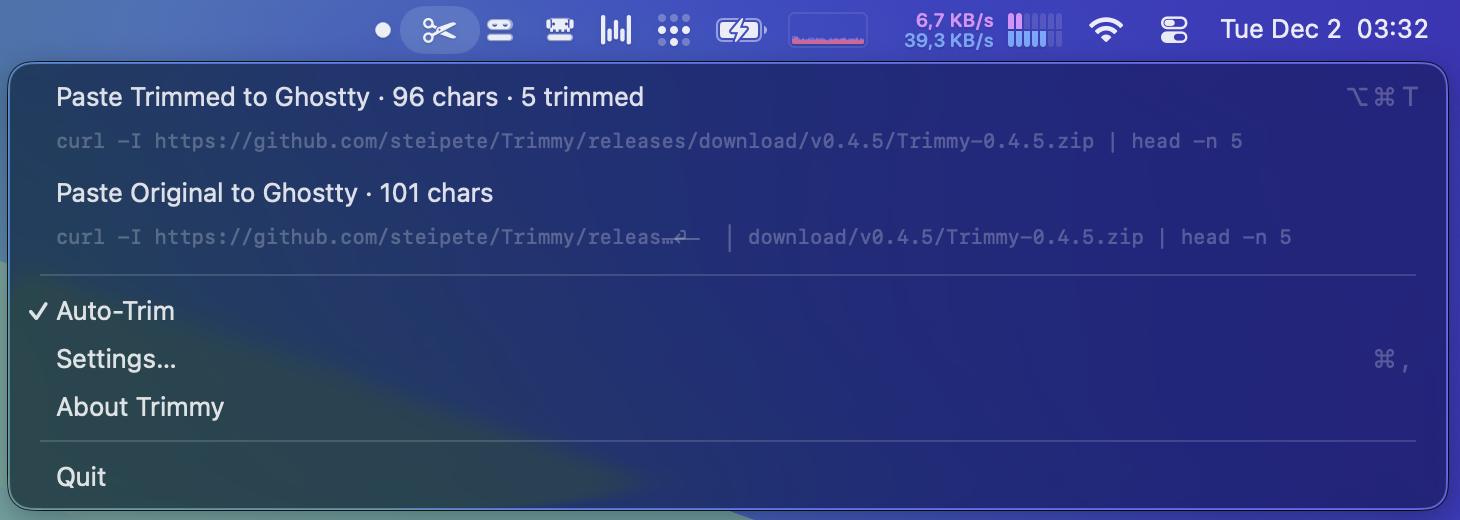
- Shows “X trimmed” on Paste Trimmed; Paste Original leaves your copy untouched.
- Three aggressiveness levels + toggles for blank lines and box stripping.
- Global hotkeys for both trimmed and original paste paths.
Why it’s handy
- Run docs/chat snippets without hand-fixing line wraps.
- Fixes terminal-wrapped URLs/pipelines that pick up stray box characters.
- Menu previews show the target app and what will paste.
- Auto-updates via Sparkle; optional launch-at-login.